JavaScript Arrays 101
CSE Under grad. || Trying to be a better developer each day || Consistency is the key
Introduction
remember when we used to go to school , we had to take schoolbags for keeping books in one pocket, notebooks in one pocket, pencils in one pocket , water bottle in one pocket ,tiffin in one pocket ,,, similarly we programmers also need a system so that we can store multiple values together .. this concept is called Arrays
what are Arrays?
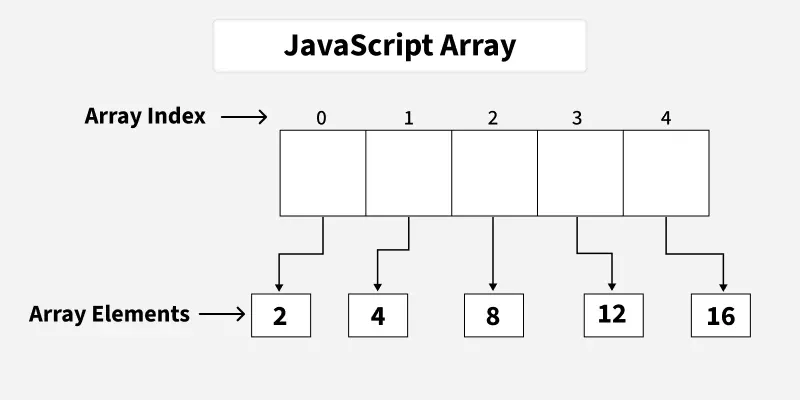
In JavaScript, an array is an ordered list of values. Each value, called an element, is assigned a number position in the array called its index.
The indexing starts at 0, so the first element is at position 0, the second at position 1, and so on.
Arrays can hold any type of data-such as numbers, strings, objects, or even other arrays
Create Arrays
you can create arrays using the [ ] brackets .
arrays can contain similar data types or different data types & even an array .
let numbers =[1,2,3,4,5];
let different=["text",12,true,[1,2,3]]
Now when you want to access these element , you just have to - write the array name and with its index - like Arrayname[index] ,,,,,
ex- arr[0] -> indicates the first element
arr[1]-> indicates the second element
You can just update these also - like arr[0]="hello"
different[0]="sam"
Array length
Array length property tells how many elements are there in the array .
for example if i write - let L = different.length .,,,
and print L - it will show 4 , as in the above section it has 4 elements
How to Loop over an array :
Sometimes we want to print or process every element in an array.
We can do this using a loop.
Example using a for loop
let fruits = ["Apple", "Mango", "Banana", "Orange"];

for(let i = 0; i < fruits.length; i++){
  console.log(fruits[i]);
}
Output:
Apple
Mango
Banana
Orange
How it works
i = 0 → fruits[0] → Apple
i = 1 → fruits[1] → Mango
i = 2 → fruits[2] → Banana
i = 3 → fruits[3] → Orange
The loop continues until it reaches the array length.